Qualify Leads 24/7 withAI-Powered Sales Chatbot
Engage website visitors instantly, qualify leads automatically, and book meetings while you sleep. Every visitor who shares an email becomes a lead in your CRM.
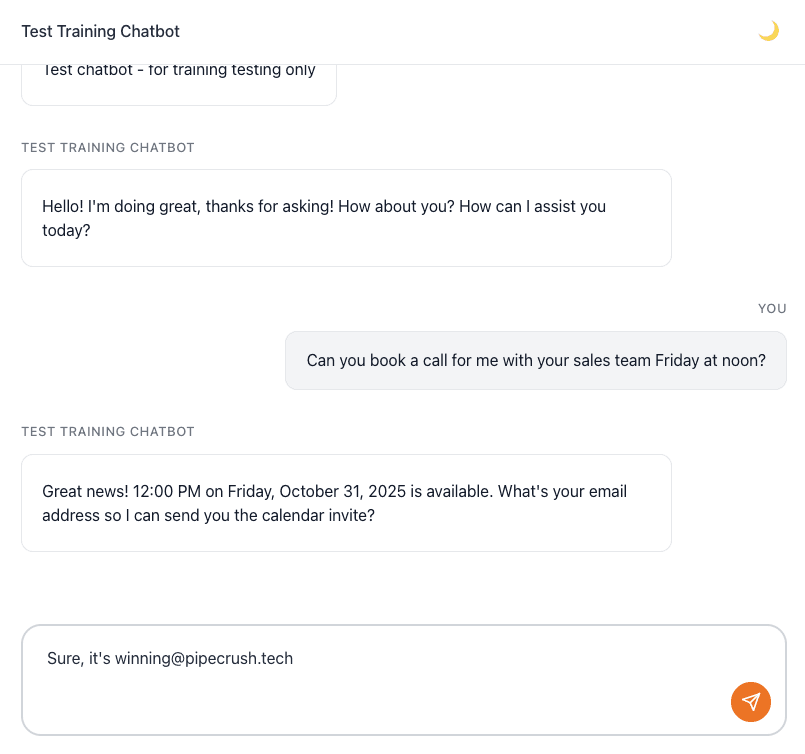
Everything You Need to Convert Visitors into Customers
From lead qualification to meeting scheduling, engage and convert prospects automatically with AI-powered conversations.
Why Sales Teams Choose Our AI Chatbot
Built for growth-focused teams who need to qualify more leads and close deals faster.
Instant Answers
Answer visitor questions the moment they ask and turn interested visitors into leads while they are still on your site.
24/7 Availability
Never miss a lead. Engage prospects any time of day, in any timezone.
Qualify at Scale
Qualify unlimited leads simultaneously. Scale your sales process without hiring more reps.
Faster Sales Cycles
Book meetings instantly, right inside the conversation, so prospects move to a sales call without waiting on email.
Ready to Turn Website Visitors into Leads?
Use the Pipe Crush AI Chatbot to qualify leads 24/7 and book meetings straight onto your calendar.
How the AI sales chatbot works in PipeCrush
The PipeCrush sales chatbot is a chat widget for your website that answers visitor questions from content you train it on, collects contact details during the conversation, and books meetings on your calendar. Every visitor who leaves an email becomes a lead in your CRM, with the chat attached.
It is the same chatbot engine PipeCrush uses for support; the difference is how you set it up. A sales chatbot is trained on product and pricing pages, asks for contact details, and has booking turned on. When a visitor wants a person, the conversation moves to your Inbox and someone on your team takes over.
It is built for small B2B teams whose website gets questions outside working hours, or faster than one person can answer them, and who want those visitors in the CRM instead of lost in a contact form.
Create the chatbot
Go to Chatbots and click New Chatbot. The wizard asks for a name, the website it will live on, a brand color, a welcome message and custom instructions that set its tone and limits, such as "only answer questions about our product; for pricing exceptions, offer a call".
Train it on your content
Add sources: a single page URL, a crawl of multiple pages of your website, pasted text such as pricing notes or objection handling, and uploaded PDF, DOCX or CSV files up to 10MB each, 20 per chatbot. You can also let it draw on your published PipeCrush knowledge base articles, filtered by category. Click Train and wait for the status to show Trained.
Set up lead capture
Pick which contact fields the chatbot should collect: first and last name, phone, company, job title and any custom fields you have defined. Email is always collected. In active mode the chatbot asks for details during the conversation.
Connect your calendar for booking
Connect Google Calendar or Outlook Calendar under Settings. Once a calendar is connected, the chatbot can check your real availability for a date or time the visitor asks about, ask for their email, and book the meeting, creating the calendar event and an appointment in PipeCrush.
Embed it
Copy one of three embed options: a script that adds a floating chat button, an iframe for an inline chat, or a direct link to a hosted chat page. You can limit the widget to your approved domains so it cannot be embedded elsewhere.
Watch conversations and take over
The Chatbots list shows conversation and lead counts for each bot, and each bot has a Conversations page with every transcript. When a visitor asks for a person, the chat appears in the Inbox under Chats. If no one replies within the takeover timeout you set (1 to 300 seconds), the bot picks the conversation back up.
How teams use it
Founder-led sales after hours
A founder trains the chatbot on the product, pricing and FAQ pages and connects a Google calendar. A visitor who asks about pricing at 10pm gets an answer from the pricing page and books a demo for the next afternoon, and the founder starts the day with a lead and an appointment already in PipeCrush.
A five-rep team triaging inbound interest
The chatbot asks each visitor about their budget and timeline as part of the conversation. Leads who give enough detail are scored and marked Working, the rest are added as cold leads, so the team can work the Working list first.
Separate bots for separate audiences
On the Growth plan a team runs one chatbot on the main site for buyers and a second on the docs site for existing customers, each with its own training sources, instructions and color. The docs bot has ticket creation on, so issues become support tickets.
Answering the same questions by text
A team that gets questions by SMS attaches the same trained assistant to its business phone number with the SMS AI agent, so text inquiries get the same answers as the website chat.
The specifics
Chatbots per plan
Solo includes 1 chatbot, Growth 5, and Pro and Business unlimited. Each chatbot has its own training sources, instructions, lead capture fields and embed code.
What a captured lead contains
When a visitor gives an email, PipeCrush reads the conversation and fills in the fields you enabled, plus any budget, timeline and pain points they mentioned. The lead is tagged with the chatbot as its source, gets a qualification score from 0 to 100, and is linked to the chat. A returning visitor updates their existing lead instead of creating a new one.
Spam and abuse protection
Lead capture can require a CAPTCHA, rejects disposable email addresses unless you allow them, rate-limits lead creation per IP address, and scores each submission for signs of automation, such as a lead captured within seconds of the chat opening, blocking the most suspicious.
What it connects to
Leads, appointments, the Inbox and support tickets are all in PipeCrush. Captured leads fire the lead.created event, so an automation can create a follow-up task or enroll the lead in a sequence, and webhooks can send it to other tools.
What it does not do
The chatbot runs on your website and, through the SMS AI agent, on a phone number. It does not run on social media or messaging apps, does not create deals on its own, and does not update its training when your website changes; retrain it after you edit your pages.
Works with the rest of PipeCrush
- Chatbot training: How website crawls, documents and pasted text become the chatbot's answers.
- Chatbot appointment booking: Let visitors pick a time from your real calendar inside the chat.
- AI support chatbot: The same engine set up to answer customers and open support tickets.
- SMS AI agent: Put the trained assistant on your business phone number.
- Unified inbox for human takeover: Where chats that need a person land for your team to answer.
Frequently asked questions
What does the chatbot use to answer questions?
It answers from the sources you train it on: website pages, crawled sites, pasted text, uploaded documents and, if you turn it on, your PipeCrush knowledge base articles. Your custom instructions set its tone and what it should not discuss.
Can the chatbot book meetings?
Yes, once the chatbot owner has connected Google Calendar or Outlook Calendar. It checks real availability, collects the visitor's email and books the slot, creating the calendar event and a PipeCrush appointment.
How does it decide which leads are qualified?
Each captured lead gets a score from 0 to 100 based on how complete their contact details are, any budget and timeline they mention, and how engaged the conversation was. New leads scoring 60 or more are marked Working; the rest start as cold leads.
Can someone on my team take over a conversation?
Yes. When a visitor asks for a person, the chat moves to the Chats tab of the Inbox, where a teammate can read the history and reply. If nobody responds within your takeover timeout, the bot resumes.
How many chatbots can I have?
One on Solo, five on Growth, and unlimited on Pro and Business.