Let Prospects BookMeetings Instantly
Eliminate scheduling back-and-forth with smart calendar automation. Prospects book directly on your calendar while interest is high.
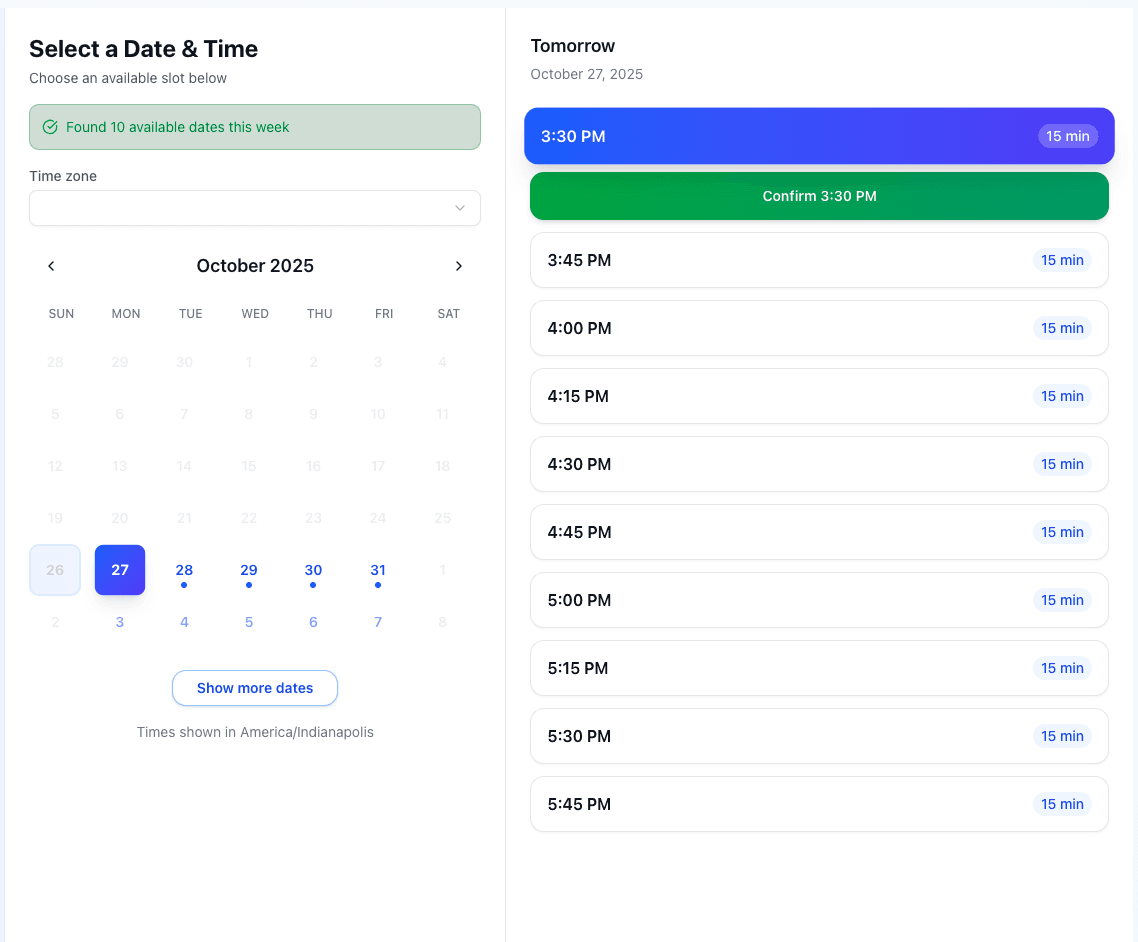
Powerful Scheduling Features That Save Time
From timezone detection to automated reminders, everything you need for seamless meeting scheduling.
Smart Availability
Set your availability preferences once. Our system automatically shows only your open time slots to prospects.
Shareable Booking Links
Create custom booking links for different meeting types. Share via email, website, or email signature.
Timezone Intelligence
Automatically detect and convert time zones. No more confusion about when meetings actually happen.
Invites & Reminders
Every booking sends a calendar invitation to you and the attendee. Add SMS reminders before the meeting with an Automation.
Video Conferencing
Google Meet links are generated automatically through Google Calendar, or add your saved Zoom or Microsoft Teams link to every booking.
Buffer, Notice & Booking Window
Keep a buffer between meetings, require minimum notice, and limit how far ahead prospects can book to protect your schedule.
Why Sales Teams Choose Pipe Crush Booking
Stop wasting time on scheduling logistics. Let automation fill your calendar with qualified meetings.
Fill Your Calendar Faster
Eliminate scheduling back-and-forth. Prospects book instantly while interest is high.
Less Calendar Tennis
Stop trading emails to find a time. Automated scheduling frees up time to focus on actual sales conversations.
Tied to Your CRM
Bookings from sequence emails link to the lead and stop their sequence. Automations can create a task when an appointment is booked and text the lead before it starts.
Track Your Bookings
See click counts for each booking link, chart appointments booked by rep on your dashboards, and mark each meeting completed or no-show.
Ready to Fill Your Calendar Faster?
Use Pipe Crush to automate scheduling and book more meetings. 7-day free trial for qualified businesses.
How online booking works in PipeCrush
Online booking gives each user a public booking page. You share a link, the other person picks an open slot, and the meeting lands on your Google or Outlook calendar and in PipeCrush as an appointment. PipeCrush reads your connected calendar before showing any times, so people only see slots you are actually free.
Because the booking page lives inside the CRM, a booking is not a stray calendar event. It is tied to the lead when the link was sent to one, it can stop that lead's email sequence, and it can trigger automations.
It is built for small B2B teams where each person books their own meetings: a founder running demos, reps sending intro-call links from their sequences, or an account manager scheduling check-ins.
Connect your calendar
Go to Settings, open the Calendar tab, and click Connect Google or Connect Outlook. PipeCrush reads busy times from every calendar you connect so booked slots never overlap your existing events.
Set your availability
On the same page, set your time zone, working hours, working days, the minimum notice a booking needs (24 hours by default) and how far ahead people can book (14 days by default, up to 365).
Choose a video meeting provider
Pick Google Meet, Zoom, Teams or none. With Google Meet, a Meet link is created for each booking through Google Calendar. With Zoom or Teams, paste your meeting link once and it is added to every booking.
Create booking links
Under Booking Links, click Create Link, give it a title such as "30-minute intro call", and pick a length of 15, 30, 60 or 90 minutes. Each saved link gets its own URL and a click count.
Share the link or insert it in an email
Copy the URL into an email signature, a LinkedIn message or your website. In the PipeCrush email editor, the calendar icon inserts a booking link as a text link or a styled button, either a saved link or a new link generated for that lead.
Manage what gets booked
The attendee picks a date and time, confirms their time zone, and enters their name and email. The appointment appears on your calendar and on the Appointments page, where you can mark it completed or a no-show after it happens.
How teams use it
Founder-led sales
A founder puts a 30-minute demo link in their email signature and on the website. Prospects book into open slots on the founder's Google Calendar, and each meeting arrives with a Meet link already attached.
Reps booking from cold email sequences
A five-rep team inserts a booking button into a sequence step. When a lead books through a link sent from a campaign, PipeCrush stops that lead's sequence so they do not get another follow-up after agreeing to meet.
Cutting no-shows
An automation that triggers a set time before an appointment starts texts the lead a reminder from the team's PipeCrush number. After the meeting, the rep marks it completed or no-show so the team can see which bookings actually happened.
Booking from the website chatbot
A visitor asks the sales chatbot for a demo and books through the chat. If they are new, PipeCrush creates a lead with the status Appointment booked and links the chat session to it.
The specifics
Limits per plan
Saved booking links count against your plan's booking calendars: 1 per user on Solo, 5 on Growth, and unlimited on Pro and Business. Links generated for a single lead from the email editor are not counted.
What the booking page asks for
Name, email, time zone and a time slot. The attendee's time zone is detected from their browser and can be changed. There are no custom intake questions.
What happens on your calendar
PipeCrush creates the event on your connected calendar with the attendee added, so the invitation comes from your own calendar. If two people try to book the same slot, the second booking is rejected and asked to pick another time.
What it connects to
Google Calendar and Outlook for availability and events; Automations for reminders, tasks and owner changes; and the public API, webhooks and MCP server, which can check availability and book, reschedule or cancel appointments.
What it does not do
Each booking link belongs to one user. There are no round-robin or team booking pages, no payments collected at booking, no custom questions, and no embeddable booking widget; you share a link instead.
Works with the rest of PipeCrush
- AI receptionist that books appointments on calls: Lets callers book a meeting during a phone call instead of through a link.
- chatbot appointment booking: How the website chatbot offers times and books meetings inside the chat.
- AI email sequences with booking links: Insert booking buttons into sequence emails and stop follow-ups once a lead books.
- appointment reminder automations: Text a reminder before an appointment or create a task when one is booked or cancelled.
- CRM lead records: Where booked appointments show up alongside a lead's calls, emails and notes.
Frequently asked questions
Which calendars does PipeCrush online booking work with?
Google Calendar and Outlook. Connect one or both under Settings > Calendar. PipeCrush checks busy times across every connected calendar before it shows a slot, and creates the event on your calendar when someone books.
Does the person booking get a confirmation?
Yes. The event is created on your connected calendar with the attendee added, so they receive a calendar invitation from your calendar provider, including the meeting link when you use one.
Can I send reminders before the meeting?
Yes, through Automations. Use the "An appointment is coming up" trigger, set how long before the start it fires (from 5 minutes to 14 days), and add a Send SMS action that texts the linked lead from your PipeCrush number.
Can a whole team share one booking page?
No. Each booking link belongs to one user and shows that user's availability. There is no round-robin or team booking page. Each rep creates their own links.
How many booking links can I create?
Solo includes 1 saved booking link per user, Growth includes 5, and Pro and Business are unlimited. Plans start at $29 a month, and a 7-day free trial is available for qualified businesses.
Can I collect payment or ask screening questions when someone books?
No. The booking page collects name, email, time zone and a time slot only. If you need to qualify someone before a meeting, use the sales chatbot or a form first, then send the booking link.