Track Every Deal fromLead to Close
Visual pipeline to manage opportunities at every stage. Kanban and list views, custom stages, follow-up dates, and a weighted pipeline value show where every deal stands and what your pipeline is worth.
Everything You Need to Manage Your Deal Pipeline
From first contact to signed contract, track every opportunity with powerful pipeline management tools.
Visual Pipeline
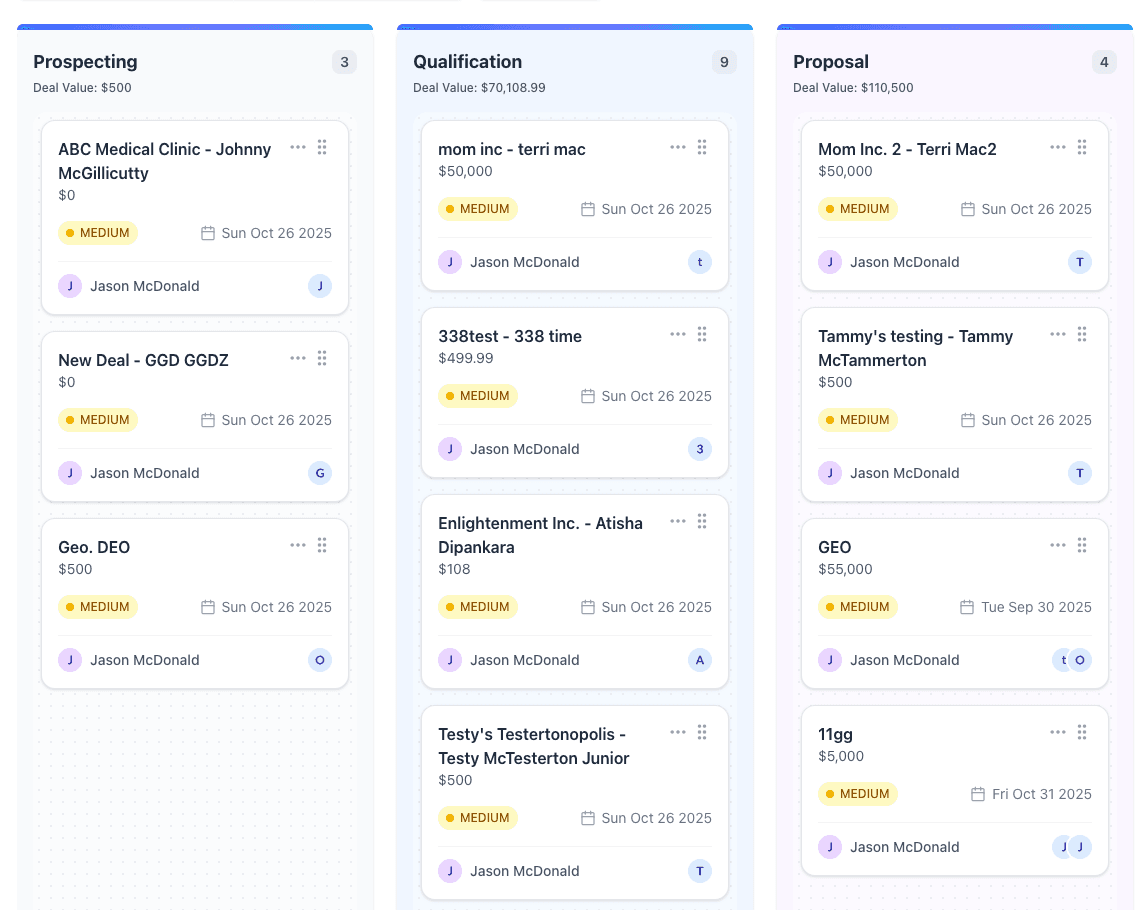
Drag-and-drop deals through customizable stages. Get a clear view of your entire sales pipeline at a glance.
Weighted Pipeline Value
Each deal amount is multiplied by its stage probability, so you see both your total open value and what it is realistically worth.
Follow-up Dates
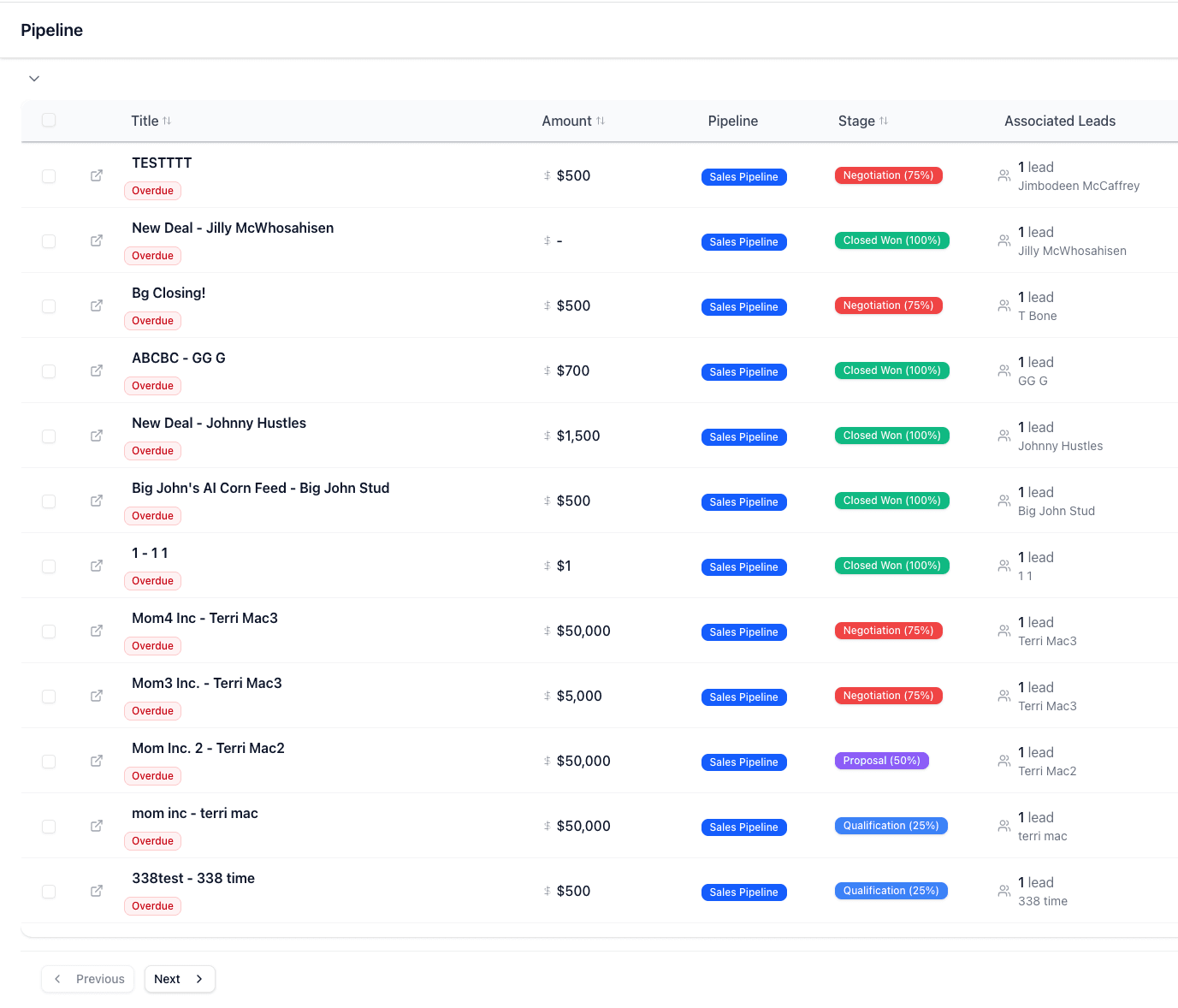
Set a follow-up date and expected close date on every deal. Overdue deals are counted on the pipeline overview and one click filters to them.
Team Collaboration
Share deal notes, assign owners, and choose whether reps can view or edit each other's deals.
Deal Documentation
Keep deal-related emails, notes, tasks, and appointments in one place. Track every interaction and decision.
Activity Timeline
Complete history of all deal activities, communications, and status changes in chronological order.
Why Sales Teams Choose Pipe Crush Pipeline
Stop losing deals to disorganization. Get complete visibility and control over your sales pipeline.
Keep Every Deal Moving
Follow-up dates, overdue counts, and deal-linked tasks help make sure no opportunity falls through the cracks. Focus on high-value deals.
Reduce Sales Cycle
Spot deals that are aging or past their expected close date, and see every stage move with who made it and when.
Data-Driven Decisions
The pipeline overview shows open value, weighted value, win rate, and deal age. Make informed strategic decisions.
Automate Repetitive Tasks
Set up automations to create follow-up tasks or update deal fields when a new deal is created.
Ready to Close More Deals?
Manage every deal, stage, and follow-up in one Pipe Crush workspace. Start your 7-day free trial for qualified businesses.
How deal tracking works in PipeCrush
A deal in PipeCrush is a revenue opportunity: a title, an amount and currency, a stage, a priority, an owner, an expected close date and an optional follow-up date. Deals live in their own pipeline, separate from lead statuses, so a prospect can stay a lead while the opportunity attached to them moves from Prospecting to Closed Won.
Deals are built for small B2B teams who sell in stages and need to see what is open, what it is worth and what is late. A founder working their own pipeline and a sales manager running a handful of reps use the same board. The difference is who can see what, which the account owner controls in settings.
Because deals sit in the same workspace as your leads, email, calls, tasks and appointments, the history of an opportunity collects on the deal record instead of in someone's inbox.
Set up a pipeline
Every account starts with six stages: Prospecting, Qualification, Proposal, Negotiation, Closed Won and Closed Lost, each with a default win probability (10, 25, 50, 75, 100 and 0 percent). You can create additional pipelines for different kinds of deals. Each pipeline holds between 3 and 10 stages, and each stage has its own name, color and probability.
Create a deal and link the people involved
Click New Deal under Sales > Deals, enter the title, amount, currency and expected close date, then set the stage, priority and owner. Link one or more leads to the deal and give each a role, so you know who the buyer is and who is just copied on the thread. Fill in any custom deal fields your account uses.
Work the board
The Deals page opens as a kanban board with one column per stage. Drag a card to move it; every move is written to the deal's stage history with who moved it and when. Switch to list view for a sortable table, or pin a deal to keep it at the top of its column.
Keep the record current
Open a deal to edit fields inline, add notes, and see its emails, appointments and tasks in tabs next to a combined activity feed. Set a follow-up date when you are waiting on the other side, and create a task tied to the deal for the next step.
Watch the numbers
The pipeline overview above the board shows open deals, weighted pipeline value (each open deal's amount times its stage probability), deals past their expected close date, and average deal age. Click Overdue to filter the board to the deals that need attention.
Close it
Moving a deal to a closed stage requires a positive amount. Marking a deal won from its detail page converts it into a customer record, after which the deal is locked so the closed figure stays as it was.
How teams use it
Founder-led sales
A founder closing the first twenty accounts uses one pipeline, sets a follow-up date on every open deal, and starts each morning on a saved view filtered to follow-ups due today. The weighted pipeline number gives a realistic answer when an investor asks what is in the funnel.
A five-rep sales team
A manager sets the workspace so reps can view and comment on each other's deals but only edit their own. Each rep works their own cards; the manager filters by owner in the weekly pipeline review and reassigns deals when someone is out.
Two lines of business
An agency that sells both one-off projects and monthly retainers keeps two pipelines with different stages, so a retainer renewal is not forced through a Proposal stage it never uses.
Handing a won deal to service
When a deal is marked won and converted, the new customer record carries the relationship forward, and the deal shows up on that customer's profile for whoever handles onboarding and support.
The specifics
Pipeline limits by plan
Solo includes 3 pipelines, Growth includes 10, and Pro and Business include unlimited pipelines. The limit is enforced when you create a pipeline; there is no overage charge.
What a deal record holds
Title, description, amount, currency, probability, stage, priority (high, medium or low), source, owner, expected close date, follow-up date, custom fields you define in Settings, linked leads with roles, notes, tasks, and a stage transition history.
Who can see which deals
Admins see every deal in the account. Sales managers can read and edit the whole team's deals. What reps see depends on the Shared Sales Workspace setting: Private (own deals only), View and comment, or Collaborative.
Automations, API and webhooks
Automations can run when a deal is created, for example to create a follow-up task tied to the deal or to set its probability or expected close date. Deals are also exposed through the PipeCrush public API and MCP server, and webhooks fire on deal created, updated and stage changed.
What it does not do
There is no quoting, e-signature or invoicing inside a deal, no native Slack or Zapier integration (use the API or webhooks instead), and no native mobile app. Probability-weighted totals are arithmetic from your stage settings, not an AI forecast.
Works with the rest of PipeCrush
- Lead management: Capture and qualify the prospects you link to each deal.
- Customer records: Where a won deal lands after it is converted.
- CRM automations: Create follow-up tasks automatically when deals are created.
- Custom sales dashboards: Build charts on deal and pipeline data for your team.
- PipeCrush API and webhooks: Read and write deals from your own systems.
Frequently asked questions
Can I change the default deal stages?
Yes. Pipelines are editable: rename stages, change their colors and win probabilities, and add or remove stages within the limit of 3 to 10 per pipeline.
How many pipelines can I have?
Solo allows 3, Growth allows 10, and Pro and Business are unlimited.
Is a deal the same as a lead?
No. A lead is a person or company you are selling to; a deal is a specific opportunity with a value and a stage. One deal can link several leads, and one lead can be linked to several deals.
What happens when I mark a deal as won?
PipeCrush asks for the customer name and a positive amount, creates a customer record, and moves the deal to Closed Won. The converted deal is then locked from further edits.
Can reps see each other's deals?
Only if you allow it. The account owner picks Private, View and comment, or Collaborative in the Shared Sales Workspace setting.
Does PipeCrush forecast revenue with AI?
No. The pipeline overview shows a weighted value based on the win probability you set for each stage. It is a transparent calculation you can adjust, not a prediction model.