Build Relationships ThatDrive Lasting Growth
Comprehensive customer management with detailed profiles, complete interaction history, and linked deals, tickets, and tasks. Know your customers deeply and build relationships that drive repeat business.
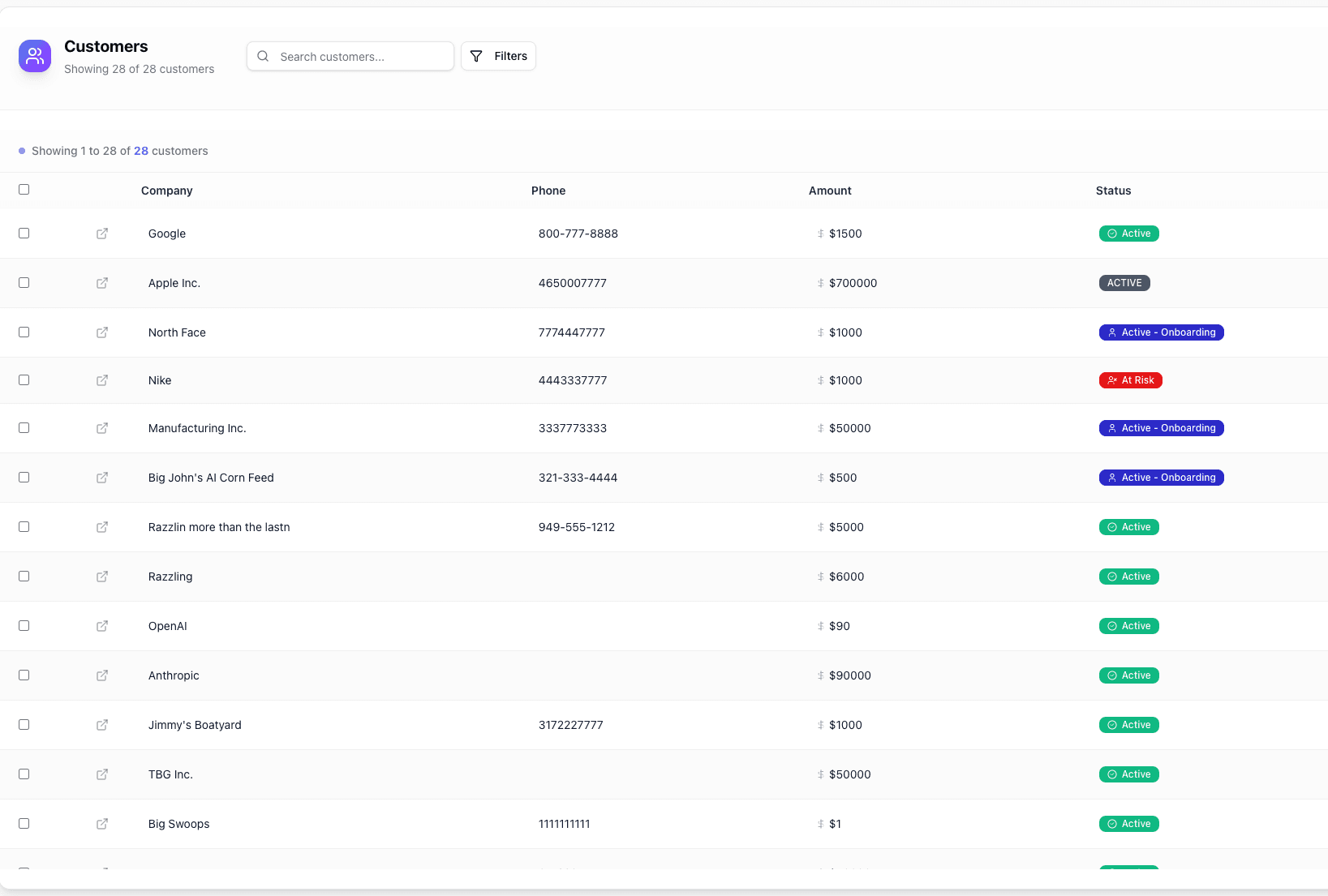
Everything You Need to Manage Customer Relationships
From first interaction to loyal advocate, nurture every customer relationship with powerful management tools.
Complete Customer Profiles
Detailed profiles with contact information, company details, deal history, and custom fields tailored to your business.
Interaction History
Track every email, call, appointment, ticket, task, and note. See the complete relationship history at a glance.
Customer Lifetime Value
See each customer's lifetime value on record right next to the value of their open deals, so you know what the account is worth today.
Smart Segmentation
Organize customers with custom statuses and custom fields, filter by status, owner, company, or any custom field, save views, and export to CSV.
Custom Statuses
Define your own customer statuses with a name, color, and icon, so every account shows at a glance where the relationship stands.
Touchpoint Management
Create tasks with reminders and book appointments to maintain regular contact and strengthen relationships.
Why Businesses Choose Pipe Crush for Customer Management
Turn one-time buyers into loyal customers. Build relationships that generate recurring revenue.
Build Lasting Relationships
Deep customer insights help you personalize interactions and build genuine relationships that drive loyalty.
Increase Customer Retention
Flag at-risk customers with a status of your own and keep them in a saved view, so you can take proactive steps before they churn.
360-Degree View
See everything about a customer in one place - deals, communications, support tickets, and more.
Organized Customer Care
Keep renewal dates in custom fields and schedule check-ins as tasks with reminders to stay top of mind.
Ready to Build Better Customer Relationships?
Manage every customer, contact, deal, and ticket in one Pipe Crush workspace. Start your 7-day free trial for qualified businesses.
How customer records work in PipeCrush
A customer in PipeCrush is an account you already do business with: a company record with its addresses, phone, website, industry, status, owner and custom fields, plus the people you deal with there as contacts. Customers are separate from leads on purpose. Leads are people you are still selling to; customers are accounts you now serve, support and sell more to.
The customer record is where sales and service meet. Deals, support tickets, tasks, appointments, emails, notes and attached files all hang off the same record, so whoever picks up the account (the rep who closed it, the person running onboarding, or the support lead answering a ticket) sees the same history.
It is built for small B2B teams that keep a book of accounts rather than a stream of one-off buyers: agencies, consultancies, service businesses and software companies with a few hundred to a few thousand customers.
Customers arrive from won business or an import
When a lead is marked Closed Won with a deal amount, or a deal is marked won from its detail page, PipeCrush creates the customer record and a contact for you. To bring an existing book across, click Import on the Customers page, upload a CSV, and confirm the column mapping. Company columns become customer records and each row becomes a contact linked to its company.
Set statuses that match your service model
Every customer has a status, Active by default. In Settings you can add your own statuses with a name, color and icon, such as Onboarding, At Risk or Churned, and define custom fields for things like contract renewal date or account tier.
Work from the customer record
Opening a customer shows four numbers across the top (lifetime value, open pipeline, contact count and customer since), an activity timeline of emails, notes, tasks, tickets, appointments and calls, and a side rail with details, custom fields, deals, contacts and attachments. Edit fields inline.
Create what comes next without leaving the page
The create menu on a customer opens a drawer for a new task, deal, contact, ticket, email or note, already linked to that account. Attach contracts and proposals as files up to 10 MB each: PDFs, images, Office documents, CSV or plain text.
Segment and export
On the Customers page, filter by status, owner, company and custom fields, save the combination as a named view, and switch between saved views. Select customers to bulk-edit a field or reassign the owner, and export the current list as a CSV.
How teams use it
Sales-to-onboarding handoff
A rep closes a deal and converts it. The onboarding lead opens the new customer, sees the won deal and the contact who signed, creates the kickoff tasks from the create menu, and attaches the signed proposal.
Account reviews for a small team
A founder sets up an At Risk status and a Renewal Date custom field, saves a view of at-risk accounts with renewals in the next quarter, and works through it each Monday with the owner of each account.
Support with context
A support lead picks up a ticket, clicks through to the customer, and sees the account's open deals, recent emails and past tickets before replying.
Expansion selling
An account manager opens a new deal from the customer record for an upsell. It shows on the customer's open pipeline figure until it closes.
The specifics
What a customer record holds
Company name, business, billing and shipping addresses, phone, website, industry, status, owner, deal value at conversion, custom fields, contacts (name, email, phone, title), deals, tickets, tasks, appointments, notes, sent emails, calls, SMS and file attachments.
How lifetime value is calculated
Lifetime value on the customer record is the amount stored on the customer, which is set from the deal amount when a lead or deal is converted and can be edited. It is not a prediction. Open pipeline is the sum of the customer's open deals.
Import rules
Imports are two-step: PipeCrush analyzes the CSV and proposes a mapping, including new custom fields, and nothing is written until you confirm. Customers are matched by company name, so re-importing a company adds contacts to the existing record instead of creating a second one.
Who sees which customers
Admins and sales managers see every customer. Support users can read customers and contacts so they can work tickets. Reps see their own accounts, or more, depending on the Shared Sales Workspace setting.
What it does not do
There are no contact tags, churn-risk scoring, website visit tracking, or birthday and renewal messages sent automatically. Use custom fields, statuses, saved views and tasks for those jobs. Customers and contacts are available through the public API and MCP server; there is no native Slack, Zapier or Shopify integration.
Works with the rest of PipeCrush
- Deal pipeline tracking: The opportunities that become customers, and the upsells that follow.
- Support ticketing: Tickets linked to the customer record for full service history.
- Lead management: Where customers start, and how they convert on Closed Won.
- Task management: Follow-ups and onboarding steps tied to each account.
- PipeCrush API: Read and update customer and contact records from other systems.
Frequently asked questions
What is the difference between a lead and a customer?
A lead is someone you are still selling to. A customer is an account you have won. PipeCrush creates the customer record when a lead or deal is marked won, and links it back to where it came from.
Can I import my existing customer list?
Yes. Upload a CSV from the Customers page and confirm the column mapping. Rows are grouped into customer records by company name, each row becomes a contact, and duplicate contacts are reported rather than overwritten.
Can one customer have several contacts?
Yes. A customer record holds as many contacts as you need, each with a name, email, phone and title.
Can I attach files to a customer?
Yes. Upload PDFs, images, Office documents, CSV or text files up to 10 MB each. Files are stored privately and downloaded through PipeCrush.
Does PipeCrush predict churn?
No. Use a custom status such as At Risk and a saved view to track the accounts you are worried about.
Can I export customers?
Yes. Export CSV on the Customers page downloads the list, including any filters you have applied.