Track & ConvertEvery Lead
Powerful lead management system to capture, organize, and nurture prospects. Smart segmentation, email validation, and automated follow-ups ensure no opportunity slips through the cracks.
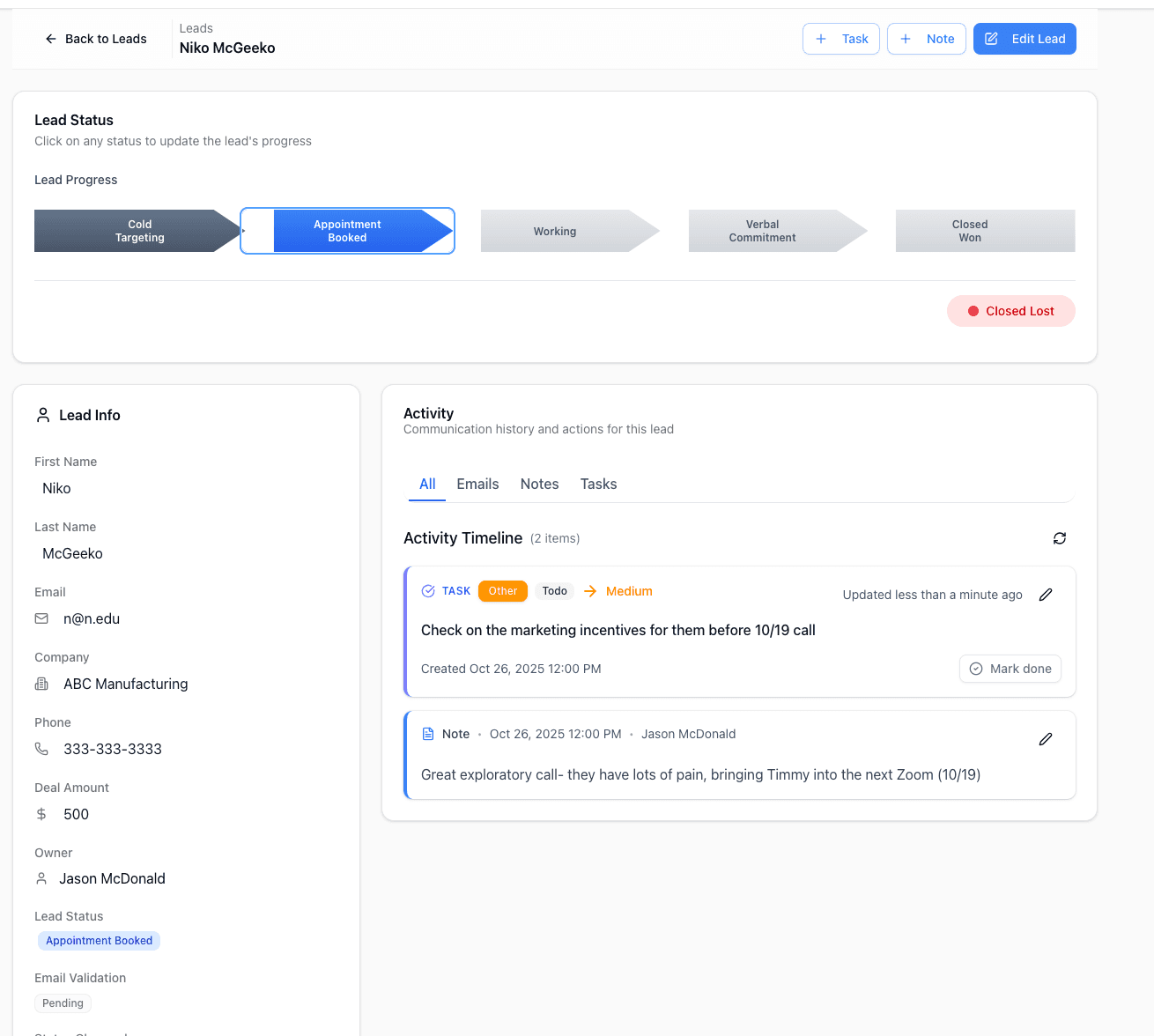
Everything You Need to Manage Leads
From initial capture to conversion, all the tools you need to turn prospects into customers.
Bulk Import & Validation
Import leads via CSV with column mapping, and duplicates are matched to existing leads. Built-in email validation checks your list before you send.
Smart Segmentation
Filter leads by status, owner, validation result, import date, calls made, task due date, and custom fields, then save the view to reuse.
Email Engagement Tracking
See who opens, clicks, and replies to your emails. Track every interaction and know exactly when to follow up.
Lead Scoring
Store a lead score on every lead. Map it from a column in your CSV import or set it with an automation rule. Scores are not calculated automatically.
Lead Enrichment
Fill in a lead's website, business email, technology, and business type. The credit cost is shown before the run, at one credit per lead.
Pipeline Metrics
See total and active leads, average time in stage, and how many leads need attention after sitting untouched for more than 7 days.
Why Sales Teams Love Our Lead Management
Stop losing leads and start converting more prospects with intelligent lead tracking.
Never Lose a Lead
Task reminders and a Needs Attention count for leads that have gone stale ensure every prospect gets the attention they deserve.
Higher Conversion Rates
Filters, saved views, and seven lead statuses help you focus on the most promising opportunities.
Less Manual Work
CSV import with column mapping, bulk validation, and automations cut down on data entry and routine follow-ups. Spend time selling, not on manual tasks.
Clean, Validated Data
Built-in email validation and duplicate detection keep your database clean and your sender reputation high.
Ready to Stop Losing Leads?
Join sales teams using Pipe Crush to track, nurture, and convert more leads. Start your 7-day free trial for qualified businesses.
How lead management works in PipeCrush
A lead in PipeCrush is a person you are trying to sell to: name, email, company, job title, phone, address, a deal amount, a pipeline status and any custom fields you add. Leads arrive from CSV imports, from people you add by hand, and from the parts of PipeCrush that talk to prospects: web forms, landing pages, chatbots, phone calls and the public API.
The Leads page is built for small B2B teams that run outbound and inbound in the same place. You import a list, check which addresses are safe to email, work the good ones through a status pipeline, and hand the ones that close over to customer records without retyping anything.
Everything that happens to a lead collects on its record: notes, tasks, emails, calls, texts and the sequences it is enrolled in. Anyone picking up the lead sees what was said and what is due next.
Import or add leads
Click Import on the Leads page and upload a CSV. PipeCrush reads the columns and proposes a mapping to lead fields, including custom fields, which you confirm before the import starts. The summary shows rows imported, duplicates and errors. Emails already in your account are matched to the existing lead instead of creating a copy. For one-off prospects, click New Lead.
Validate the email addresses
Select leads and click Validate. Each address is marked valid, risky or invalid, and new imports stay pending until checked. Validation draws on your plan's monthly allowance, and the Settings > Validation page controls whether sequences and campaigns may send to risky or unvalidated addresses.
Fill the gaps with enrichment
For leads that arrive with only a name, phone or address, select them and click Enrich. PipeCrush looks for the business website, finds or derives a business email with a verification status, and reports the site's technology and business type. Enrichment is billed in credits, one per lead, shown before the run starts.
Filter and save views
Use the advanced filter builder to combine conditions on status, validation, import date, calls made, task due date and custom fields, narrow by owner from the filter menu, then save the result as a named view. Every account starts with All Leads, Valid Only and Needs Validation.
Work the pipeline
Leads move through Cold Targeting, Appointment Booked, Working, Verbal Commitment, Closed Won and Closed Lost, with Disqualified for leads that do not fit. Switch between the table and a kanban board, or click a stage on the lead's progress bar. From the lead record you can call or text, add notes and tasks, and enroll the lead in an email sequence.
Convert the win
Marking a lead Closed Won asks for a positive deal amount, then converts the lead into a customer record with a contact attached. The lead shows a Converted badge and links to the new customer.
How teams use it
Outbound from a purchased list
A founder uploads a 2,000-row CSV, validates it, saves a Valid Only view, and enrolls that view in an AI email sequence. Risky addresses go into a separate, smaller send so bounces do not hurt the main domain.
Local business prospecting
A team selling to clinics or trades has names and phone numbers but no emails. They run enrichment to find each business website and email, then call the leads that came back without one.
Inbound from the website
Form fills, landing page sign-ups and chatbot conversations create leads with their source and form name recorded. An automation assigns each new lead to the next rep in a round-robin and creates a follow-up task.
A manager balancing a team's book
A sales manager filters by owner, bulk-changes the owner on a departing rep's leads, and uses the kanban board in pipeline reviews to see which leads are stuck in Working.
The specifics
Contact and validation limits by plan
Solo includes 2,500 contacts and 500 validations a month, Growth 15,000 contacts and 2,500 validations, Pro 50,000 contacts and 10,000 validations, and Business unlimited contacts and 25,000 validations. Limits are hard caps with a warning at 80 percent; there is no overage billing.
What a lead record holds
Contact details, company, job title, address, LinkedIn URL, deal amount, status, owner, source, form name, UTM source, medium and campaign, lead score, last email open and click dates, custom fields, notes, tasks, and email, call and SMS history.
Lead scores are yours to set
PipeCrush stores a lead score field you can import, edit or set with an automation. It does not calculate a score for you from engagement.
Automations, API and MCP
Automations can run when a lead is created or updated: create tasks, reassign the owner (including round-robin), update fields, enroll the lead in a sequence or campaign, send an SMS or place a call. Leads are also available through the public API, webhooks and the MCP server.
What it does not do
There are no contact tags (use custom fields and saved views instead), no native Slack, Zapier or Shopify integration, and no native mobile app.
Works with the rest of PipeCrush
- Lead enrichment: Find websites and business emails for leads that arrive with only a name or phone number.
- AI email sequences: Enroll validated leads in personalized multi-step outreach.
- Deal pipeline tracking: Link leads to revenue opportunities with their own stages.
- Lead routing automations: Assign owners and create follow-up tasks when leads arrive.
- AI forms: Capture inbound leads straight into your lead list.
Frequently asked questions
What happens to duplicate emails when I import?
PipeCrush matches them to the lead that already exists instead of creating a second record, and the import summary lists them as duplicates.
Is email validation included in my plan?
Yes, up to the monthly allowance: 500 on Solo, 2,500 on Growth, 10,000 on Pro and 25,000 on Business.
Does PipeCrush score leads automatically?
No. There is a lead score field you can import, edit by hand or set with an automation, but PipeCrush does not compute one from behavior.
Can I see which leads opened or clicked my emails?
Yes for email marketing campaigns: opens and clicks are tracked per recipient, and the lead record keeps the date of the last open and last click.
How do leads become customers?
Move the lead to Closed Won and enter a positive deal amount. PipeCrush creates a customer record and a contact from the lead and marks the lead as converted.
Can I tag leads?
PipeCrush does not have tags. Custom fields, statuses, owners and saved views cover the same need.